Should You Upgrade from Samsung Galaxy Chromebook 2 360 to Msi Cubi Nuc 1M?
The Great Computing Crossroads: Portability vs. Power
The landscape of personal computing has shifted dramatically over the last few years, moving away from the "one size fits all" approach of the traditional tower PC toward more specialized, form-factor-driven solutions. For many, the Samsung Galaxy Chromebook 2 360 has been a reliable companion—a specialized 2-in-1 device designed to bridge the gap between educational needs and casual entertainment. However, as user needs evolve and the demand for more robust processing power, better connectivity, and dedicated home office setups grows, many are eyeing the MSI Cubi NUC 1M as a potential successor. It is a fundamental shift in philosophy: moving from a ChromeOS-based mobile convertible to a Windows-powered stationary Mini PC. This article explores whether this leap is the right one for your specific workflow.
At first glance, comparing a laptop to a mini PC might seem like comparing apples to oranges. One is a self-contained unit with a screen and keyboard; the other is a tiny box that requires external peripherals. Yet, for a significant demographic of users—remote workers, students who have finished their degrees, and home media enthusiasts—the transition makes perfect sense. The Samsung Galaxy Chromebook 2 360 was built for a world of browsing and light document editing. The MSI Cubi NUC 1M is built for a world of multitasking, high-resolution multi-monitor setups, and professional-grade productivity. Understanding which side of that line you fall on is the key to deciding if an upgrade is necessary.
Analysis of the Samsung Galaxy Chromebook 2 360: The Mobile Lightweight
The Samsung Galaxy Chromebook 2 360 is a testament to the "less is more" philosophy of Google’s ChromeOS ecosystem. Released with a focus on the K-12 education market and the budget-conscious consumer, it features an 12.4-inch WQXGA (2560 x 1600) touch display that punches far above its weight class in terms of resolution. Its primary strength lies in its flexibility. As a 360-hinge convertible, it can transform from a standard laptop into a tablet, a tent for viewing media, or a stand for digital sketching. It is powered by the Intel Celeron N4500 processor, a chip designed for efficiency rather than raw speed.
In a real-world use case, the Galaxy Chromebook 2 360 excels in environments where portability is paramount. If your day consists of moving from a coffee shop to a library, taking handwritten notes with a stylus, and relying heavily on Google Workspace (Docs, Sheets, Slides), this device is nearly perfect. It is silent, stays relatively cool, and offers a ruggedized build quality that can survive a few bumps in a backpack. However, the 4GB of RAM commonly found in these units acts as a strict ceiling. Try to keep twenty Chrome tabs open while participating in a Google Meet, and the interface will inevitably begin to stutter. This "performance wall" is the primary motivator for users looking to upgrade.
Analysis of the MSI Cubi NUC 1M: The Desktop Powerhouse in a Box
The MSI Cubi NUC 1M represents a different tier of computing altogether. As a Mini PC, it discards the screen and keyboard to focus entirely on internal components and connectivity. Based on the Intel Core U-series (Raptor Lake or newer) architecture, it offers a massive jump in instructions per cycle (IPC) compared to the Celeron found in the Samsung. With options for much higher RAM capacities (up to 64GB DDR5 in some configurations) and lightning-fast NVMe SSD storage, the MSI Cubi NUC 1M is designed to handle modern Windows 11 workloads with ease.
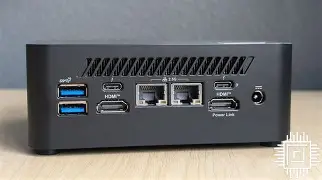
Productivity is the MSI's middle name. It is equipped with dual Thunderbolt 4 ports, dual HDMI outputs, and a robust array of USB-A ports. This means you can power multiple 4K monitors simultaneously while having your webcam, external microphone, and backup drives plugged in without needing a single dongle—a far cry from the port-limited experience of the Samsung Chromebook. It is also designed with sustainability and maintenance in mind, featuring an easy-to-open chassis that allows users to upgrade their own RAM and storage, extending the life of the machine significantly compared to the "disposable" nature of soldered-component Chromebooks.
Shop the latest Laptops & Computers picks on Amazon.
Browse Now →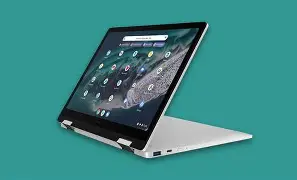
Key Advantages and Disadvantages
Samsung Galaxy Chromebook 2 360
- Pros: Exceptional 2560 x 1600 touch display with great color accuracy for the price point. 2-in-1 form factor provides immense versatility for different viewing modes. Ruggedized design makes it ideal for younger users or frequent travelers. ChromeOS provides a simplified, secure environment with very little maintenance required.
- Cons: The Intel Celeron N4500 processor struggles with heavy multitasking or Linux-based applications. 4GB of RAM is insufficient for modern web-heavy workflows. Limited port selection requires adapters for desktop-style use. Permanent internal components mean the device cannot be upgraded over time.
MSI Cubi NUC 1M
- Pros: Significant performance leap with Intel Core i3, i5, or i7 processors. Expandable DDR5 memory and M.2 SSD storage facilitate a much longer hardware lifecycle. Incredible connectivity options, including dual Thunderbolt 4 and dual 2.5G LAN on specific models. Support for up to four displays makes it a professional workstation powerhouse.
- Cons: Lacks portability; requires a dedicated monitor, keyboard, and mouse to function. Higher power consumption than a mobile Chromebook. Windows 11 requires more active management (updates, antivirus) compared to the "hands-off" nature of ChromeOS. No built-in battery, making it susceptible to data loss during power outages without a UPS.
Direct Performance and Specification Comparison
To truly understand the gap between these two machines, we must look at the technical specifications. One is a mobile efficiency machine; the other is a compact desktop intended for performance.
| Feature | Samsung Galaxy Chromebook 2 360 | MSI Cubi NUC 1M |
|---|---|---|
| Processor | Intel Celeron N4500 (Dual-Core) | Intel Core i3/i5/i7 (U-Series, Multi-core) |
| Memory | 4GB LPDDR4x (Soldered) | Up to 64GB DDR5 (2x SO-DIMM slots) |
| Storage | 64GB or 128GB eMMC | M.2 NVMe SSD (User replaceable) |
| Operating System | ChromeOS | Windows 11 Home/Pro or Linux |
| Display Support | Integrated 12.4" Display + 1 External | Supports up to 4x 4K Monitors |
| Ports | 2x USB-C, 1x USB-A, MicroSD | USB-C (Thunderbolt 4), 4x USB-A, 2x HDMI, 2x LAN |
| Primary Use Case | Mobile light productivity & student use | Professional office, media server, multitasking |
Buying Guide: Determining Your Upgrade Path
Deciding to switch from the Samsung Galaxy Chromebook 2 360 to the MSI Cubi NUC 1M is less about "newness" and more about "utility." Before making the purchase, ask yourself where you spend 80% of your computing time. If you find yourself frequently frustrated by the Samsung's screen size or its inability to run specialized software like the full Adobe Creative Cloud suite, Microsoft Excel with heavy macros, or specialized IDEs for programming, the MSI is a logical evolution. The MSI Cubi NUC 1M provides the thermal headroom and architectural muscle to handle these desktop-class applications that ChromeOS simply cannot.
Another factor is your physical workspace. The Samsung Galaxy Chromebook 2 360 is a "lap-first" device. It is meant for the couch, the airplane tray table, or the classroom desk. The MSI Cubi NUC 1M, however, is the heart of a "desk-first" setup. If you have recently invested in a high-quality 27-inch monitor and an ergonomic keyboard, the Samsung becomes little more than a bulky connector. The MSI can be VESA-mounted to the back of your monitor, effectively turning it into a powerful All-in-One PC that clears your desk of clutter while providing ten times the connectivity options of the laptop it replaces.
Software compatibility is the final, and perhaps most critical, pillar of this decision. ChromeOS is wonderful for its speed and simplicity, but it is built on the premise that the cloud is enough. As users move into more complex professional roles, "enough" often becomes "insufficient." Local file management, advanced peripheral drivers, and the sheer breadth of X86-64 software available for Windows 11 make the MSI Cubi NUC 1M a much more versatile tool for a career-focused individual or a creative hobbyist.
Real-World Use Case Scenarios
The Graduating Student
Consider a student who used the Samsung Galaxy Chromebook 2 360 throughout college. It served them well for writing essays and streaming videos. However, upon entering a career in data analysis or accounting, they now need to run specialized finance software and maintain massive spreadsheets that lag the Celeron processor. For this user, upgrading to the MSI Cubi NUC 1M allows them to create a dedicated home office. They can plug in two monitors—one for the data source and one for the report—and experience the snappy response of a modern Windows machine. The Samsung can remain as a secondary device for casual browsing on the couch.
The Home Media Manager
A user who previously used their Chromebook to cast movies to a TV might find the experience clunky due to Wi-Fi limitations or the lack of a dedicated Ethernet port. By switching to the MSI Cubi NUC 1M, they gain a device with dual 2.5G LAN ports and massive storage expandability. It can function as a permanent Media Server (Plex or Jellyfin), sitting silently under the TV or in a closet, providing high-bitrate 4K content to every device in the house. This is a task the Samsung was never designed to handle.
Find top-rated Laptops & Computers products at great prices.
View Offers →The Remote Professional
For the remote worker tired of "dongle life," the MSI Cubi NUC 1M is a revelation. The Samsung Galaxy Chromebook 2 360 requires a USB-C hub to connect a mouse, a headset, and an external monitor at once. These hubs can be unreliable and often overheat. The MSI Cubi NUC 1M’s native port selection means everything has a permanent home. The stability of a wired connection and the power to run background apps like Slack, Spotify, and Zoom simultaneously without the fan ramping up to a whine is a significant quality-of-life improvement.
The Verdict: Is the Upgrade Worth It?
The transition from a Samsung Galaxy Chromebook 2 360 to an MSI Cubi NUC 1M is as much about changing your lifestyle as it is about changing your hardware. You are trading the convenience of a built-in screen and the "anywhere, anytime" nature of a 2-in-1 for the "uncompromising power" and "limitless expansion" of a professional Mini PC. If you find your Samsung collecting dust on a desk because its screen is too small or its performance is too sluggish, then the MSI is not just an upgrade—it is a liberation.
However, if you truly value that 12.4-inch WQXGA screen and the ability to draw with a stylus, you must realize that the MSI Cubi NUC 1M will require you to purchase those peripherals separately. The cost of a good monitor and input devices must be factored into the upgrade price. For those who already have a desktop setup and are just looking for the engine to drive it, the MSI Cubi NUC 1M is an easy recommendation. It is a more mature, capable, and durable piece of technology that will serve you faithfully long after the Samsung’s eMMC storage and non-upgradable RAM have become obsolete.
Ultimately, the Samsung Galaxy Chromebook 2 360 is a gateway to the internet, while the MSI Cubi NUC 1M is a gateway to productivity. If your goals have shifted from consumption to creation, from the classroom to the boardroom, or from the simple to the complex, the MSI Cubi NUC 1M is the superior tool for the next chapter of your digital life.