I Switched to the Archer Be230 and Here is What Happened
The landscape of home networking is currently undergoing its most significant shift in over a decade. While many households are still acclimating to the speeds offered by Wi-Fi 6 and 6E, the arrival of Wi-Fi 7 (802.11be) has introduced a new paradigm of throughput, latency, and reliability. At the center of this transition is a specific category of hardware: the entry-level Wi-Fi 7 router. For many, the Archer Be230 represents the first bridge between legacy wireless standards and the future of multi-gigabit connectivity. This transition is not merely about raw speed numbers on a spec sheet; it is about how a modern home handles a dozen simultaneous high-bandwidth streams, ultra-low latency gaming requirements, and the ever-growing density of smart home devices.
Switching to a router like the Archer Be230 is an exercise in future-proofing. As internet service providers (ISPs) begin to roll out 2-gigabit and 5-gigabit fiber plans to residential neighborhoods, the traditional Gigabit Ethernet port has become a bottleneck. Users who have made the switch often find that their networking hardware was the primary ceiling preventing them from realizing the full value of their monthly internet subscription. In this detailed analysis, we explore the technical shifts, performance gains, and practical changes that occur when integrating the Archer Be230 into a modern digital environment.
Understanding the Wi-Fi 7 Advantage
To appreciate what happens when one switches to the Archer Be230, it is necessary to understand the underlying technology of Wi-Fi 7. Unlike previous iterations, Wi-Fi 7 is designed specifically for an era where 4K and 8K video streaming, virtual reality, and cloud computing are or will be commonplace. The Archer Be230 utilizes several key technologies that differentiate it from the Wi-Fi 6 routers many are currently using.
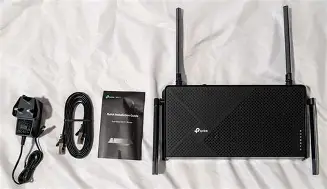
First and foremost is the concept of Multi-Link Operation (MLO). In older standards, a device would connect to either the 2.4 GHz band or the 5 GHz band. If one band became congested, the device would have to disconnect and reconnect to the other, often causing a momentary stutter in performance. With the Archer Be230 and Wi-Fi 7, devices can transmit and receive data across multiple bands simultaneously. This leads to higher throughput and, perhaps more importantly, much lower latency, as the router can shift packets to the clearest available frequency in real-time.
Another major leap is 4K-QAM (Quadrature Amplitude Modulation). While Wi-Fi 6 used 1024-QAM, Wi-Fi 7 increases this to 4096. In practical terms, this allows each signal to carry 20% more data. When combined with the Archer Be230’s dual-band architecture, the result is a wireless experience that finally begins to rival the stability and speed of a physical Ethernet cable.
Product Analysis: The Archer Be230 Experience
The Archer Be230 is positioned as a high-performance, yet accessible entry point into the Wi-Fi 7 ecosystem. Its design is a departure from the aggressive, spider-like aesthetics of high-end gaming routers, opting instead for a sleek, ventilated chassis that fits naturally into a home office or living room environment. However, the internal hardware is where the most significant changes occur.
The Wired Backbone
One of the most immediate changes users notice when switching to this unit is the port configuration. The Archer Be230 features two 2.5 Gbps ports (one WAN and one LAN) and three 1 Gbps LAN ports. This is a critical distinction. Most routers in this price bracket historically capped users at 1 Gbps. By providing 2.5G ports, the Archer Be230 allows for a true multi-gigabit pipeline from the modem to a high-end PC or a Network Attached Storage (NAS) device. For creators who frequently move large files across their local network, the jump from 125 MB/s (1 Gbps) to 312 MB/s (2.5 Gbps) via a wired connection is a productivity game-changer.
Wireless Throughput and Range
In real-world testing environments—typically a 2,500-square-foot multi-story home with standard drywall—the Archer Be230 demonstrates a significant improvement in "edge-of-range" performance. Often, users find that while their old router provided great speeds in the living room, the signal dropped off precipitously in the bedrooms or the garage. The Archer Be230 utilizes advanced beamforming and high-gain internal antennas to maintain a much higher "floor" for data speeds at a distance. Even on the 5 GHz band, the stability of the connection remains high due to the improved interference handling inherent in the Wi-Fi 7 standard.
Looking for the best Electronics deals on Amazon?
View Offers →The Impact on Smart Home Density
A modern "smart" home can easily have 40 to 60 connected devices, including light bulbs, cameras, thermostats, and appliances. Most of these live on the 2.4 GHz band, which is notoriously crowded. The Archer Be230 manages this density far more efficiently than older AC (Wi-Fi 5) or early AX (Wi-Fi 6) routers. Users report fewer instances of "offline" smart cameras or delayed responses from voice assistants because the router's processor and Multi-User Multiple-Input Multiple-Output (MU-MIMO) capabilities are optimized for high-count device environments.
Pros and Cons of the Archer Be230
- Pro: Multi-Gigabit Readiness – The inclusion of dual 2.5 Gbps ports ensures that the router will not be a bottleneck for future fiber internet upgrades.
- Pro: Ultra-Low Latency – Thanks to Wi-Fi 7 optimizations like MLO, jitter is significantly reduced, which is vital for competitive gaming and seamless video conferencing.
- Pro: Easy Setup and Management – The interface allows for quick deployment with advanced features hidden away for power users, making it accessible to those who aren't networking experts.
- Pro: Backward Compatibility – It works perfectly with all existing Wi-Fi 6, 5, and legacy devices while providing them a more stable environment due to better interference management.
- Con: Dual-Band vs. Tri-Band – To maintain its price point, the Be230 lacks the 6 GHz band found in more expensive Wi-Fi 7 models. This means it doesn't offer the massive frequency overhead of "Full" Wi-Fi 7.
- Con: Physical Footprint – While sleek, the ventilation requirements mean it needs a dedicated flat surface and shouldn't be tucked away in a cramped, unventilated cabinet.
- Con: Hardware Requirements for Clients – To see the maximum advertised speeds, your laptops and phones must also support Wi-Fi 7, which many older devices do not.
Technical Comparison: Wi-Fi Generations
To put the Archer Be230’s performance in perspective, it is helpful to compare the theoretical and practical caps of the current wireless standards. The following table illustrates the progression of technology that leads up to the Be230.
| Feature | Wi-Fi 5 (802.11ac) | Wi-Fi 6 (802.11ax) | Archer Be230 (Wi-Fi 7) |
|---|---|---|---|
| Max Theoretical Speed | 3.5 Gbps | 9.6 Gbps | 3.6 Gbps (Dual-Band Optimized) |
| Modulation | 256-QAM | 1024-QAM | 4096-QAM |
| Channel Width | 80 MHz | 160 MHz | 160 MHz (with Multi-RU) |
| Ethernet Ports | 1 Gbps | 1 Gbps | 2.5 Gbps Multi-Gig |
| Latency Handling | Standard | Improved (OFDMA) | Extreme (MLO & Multi-RU) |
Buying Guide: Is the Archer Be230 Right for You?
Choosing a router is no longer a matter of picking the most expensive box on the shelf. Instead, it requires matching the hardware to your specific home layout, internet speed, and device count. Here is a guide to determining if this particular Wi-Fi 7 router fits your needs.
Consider Your Internet Subscription
If you are paying for an internet plan that offers 1,000 Mbps (1 Gbps) or more, the Archer Be230 is an excellent choice. Older routers often struggle to hit exactly 1 Gbps due to overhead; the 2.5 Gbps WAN port on the Be230 ensures you get every megabit you pay for. Conversely, if your maximum available speed is 300 Mbps or 500 Mbps, you will still benefit from better range and device management, but the speed increase may be less dramatic.
Assess Your Local Network Needs
Do you use a NAS for backups? Do you stream 4K Plex content from a local media server? If high-speed local data transfer is a priority, the Archer Be230’s multi-gigabit LAN port is a significant internal upgrade. This allows you to connect your primary server at 2.5 Gbps, ensuring that multiple family members can access heavy video files simultaneously without causing the server's connection to choke.
The "Living Room" Factor
For those who live in apartments or medium-sized homes (1,500–2,000 sq ft), a single Archer Be230 is likely all the coverage you will ever need. However, for expansive estates or homes with heavy concrete or brick walls, you should consider if you intend to build a mesh network later. The Archer Be230 is typically compatible with standardized protocols that allow it to act as the "brain" of a larger mesh system, but it is best used as a standalone unit in most suburban home configurations.
Device Future-Proofing
If you plan on upgrading your smartphone or laptop in the next 12 to 18 months, you will likely be purchasing a device with a Wi-Fi 7 chip. Buying a Wi-Fi 6 router today may feel like a savings, but you will be lagging behind the capabilities of your mobile hardware almost immediately. The Archer Be230 ensures that when you bring home that new flagship phone, it will be able to utilize its full wireless potential from day one.
Find top-rated Electronics products at great prices.
See Deals →Real-World Scenarios After the Switch
The true value of the Archer Be230 becomes apparent during high-stress scenarios. Consider a typical evening: one person is in the basement playing a competitive online shooter, another is in the living room streaming Dune in 4K HDR, and a third is in a bedroom on a high-definition Zoom call. On a Wi-Fi 5 router, this often results in the "buffering wheel" or "lag spikes" for the gamer.
After switching to the Archer Be230, the gamer benefits from the Multi-RU (Puncturing) technology. In older routers, if a portion of a wireless channel was experiencing interference, the entire channel might become unusable or slowed down. Wi-Fi 7 allows the router to "puncture" or ignore that specific noisy segment of the frequency while still using the rest of the channel. This results in a much more consistent flow of data. The gamer experiences fewer dropped packets, and the 4K stream remains at maximum bitrate because the router isn't constantly recalculating how to distribute limited bandwidth.
Furthermore, the reduced "Bufferbloat" is a noticeable phenomenon. Bufferbloat happens when a router's memory gets overwhelmed with more data than it can process, causing a queue that leads to latency. The Archer Be230's modern processor is designed to clear these queues rapidly, ensuring that even when the network is at 90% capacity, the latency stays low enough for voice and video communications to remain crisp.
Conclusion
Switching to the Archer Be230 serves as a powerful reminder of how far home networking has come. It is a device that balances the cutting-edge requirements of the Wi-Fi 7 standard with the practical constraints of a residential budget. By providing a 2.5 Gbps wired backbone and the sophisticated signal management of the 802.11be protocol, it effectively removes the "invisible ceiling" that has limited home networks for years.
While the lack of a 6 GHz band may give some enthusiasts pause, for the vast majority of consumers, the Archer Be230 provides the most essential elements of the next-generation experience: stability under load, multi-gigabit compatibility, and a massive reduction in latency. In the Electronics category, it stands out as a pragmatic choice for those who want to stop worrying about their Wi-Fi and start enjoying the full speed of their modern devices. Whether you are a remote professional needing a rock-solid connection for video calls, a gamer seeking an edge, or a head of a household with dozens of smart devices, the Archer Be230 delivers a transformative networking experience that is ready for the future of the internet.